
Track symptoms easily
Log cough, sore throat, tummy pain, rash and other symptoms in a few taps, with notes about how your child feels.
When children are sick, symptoms can change quickly. Tracking fever, medication, and symptoms helps parents and doctors understand how the illness progresses.
Download KidCare Tracker
When your child is sick, track symptoms, temperature, and medication on one timeline. This helps you and your doctor see how the illness is progressing and what has already been given.
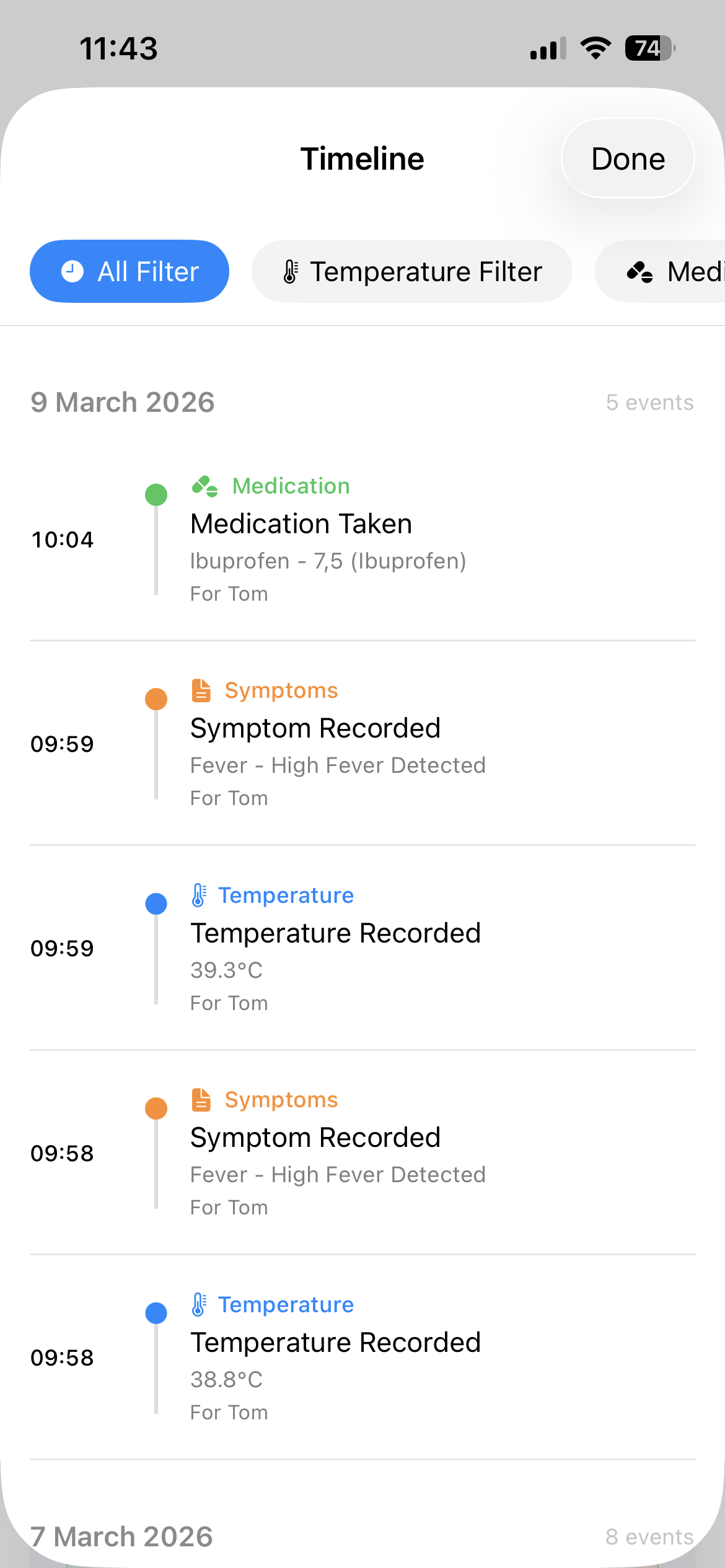
KidCare Tracker lets you log symptoms, temperature readings and medication doses on a single timeline. You can review how things changed over hours or days, which is especially helpful when you need to explain what happened to a doctor.
Doctors often ask parents important questions during visits:
Parents rarely remember every detail, especially after several days of broken sleep and worry. A simple log of symptoms, temperature and medicines can make those conversations easier and more precise.
Log cough, sore throat, tummy pain, rash and other symptoms in a few taps, with notes about how your child feels.
Add temperature readings throughout the day or night so you can see how fever is changing over time.
Record what medicine you gave, how much and when, so you don't have to rely on memory later.
Combine symptoms, fever and medication into one clear timeline you can show to your doctor.
Watch how KidCare Tracker records symptoms, temperatures and medicines as your child recovers from an illness.
The demo shows a parent adding symptoms and doses over several days, then reviewing the illness timeline before a doctor visit.
See symptoms, fever and medicine together instead of trying to remember separate notes or times.
Bring a clear history to appointments so doctors can see how your child's illness changed over time.
Stop trying to keep every detail in your head when you're already tired and worried.
How should I track my child's symptoms?
In KidCare Tracker, you can add new symptom entries whenever something changes—such as a new cough, rash or vomiting. Short notes like "worse at night" or "improved after medicine" can be very useful later when speaking with a doctor.
Why is it useful to track illness history?
Illness history helps you and your child's doctor see patterns: how long a fever lasted, how symptoms changed, and which medicines seemed to help. It also reduces the stress of trying to remember everything during a short appointment.
Can this information help doctors?
Yes. While only qualified healthcare professionals can diagnose or treat illnesses, having a clear record of symptoms, temperatures and medicines can help them make decisions more quickly and confidently. KidCare Tracker does not provide medical advice, but it helps you bring better information to your doctor.
How do I prepare for a doctor visit using KidCare Tracker?
Before a doctor visit, you can review your child's illness timeline in the app and generate a PDF export that shows temperature readings, medication doses, and symptom notes in chronological order. This gives the doctor a clear picture of how the illness progressed without relying on memory.
Can I track multiple symptoms at the same time?
Yes. KidCare Tracker lets you log multiple symptoms during a single illness episode. For example, you can record fever alongside cough, rash, or vomiting. Each symptom entry appears in the shared timeline, giving a complete picture of how the illness evolved day by day.
Turn difficult sick days into a clear timeline that supports better conversations with your child's doctor.
Download KidCare Tracker